
Download Spare Parts APK – spare parts, android settings, hidden settings, battery information, free android tool
Overview
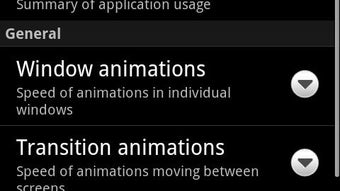
Spare Parts APK is a free desktop-like utility designed for Android users seeking deeper control over their device’s configuration. Developed by DroidGram, the app focuses on exposing hidden system settings that are typically inaccessible through standard Android interfaces. It allows users to modify advanced parameters that may influence performance, battery behavior, and device functionality. The software is particularly useful for power users and enthusiasts who want to customize their Android experience beyond default options.
By providing access to detailed battery information, Spare Parts helps users monitor energy consumption and optimize device usage. This feature is especially beneficial for those managing multiple apps or troubleshooting battery drain issues. The tool is built on open-source principles, ensuring transparency and community-driven improvements. While the developer did not provide additional details about the app’s background or development roadmap, its open code foundation suggests ongoing community contributions.
Real-world usage scenarios include adjusting low-level settings for better performance, diagnosing battery anomalies, or experimenting with device behavior. It is suitable for both casual users interested in exploring hidden features and advanced users seeking fine-tuned control. The app’s lightweight nature and lack of advertisements enhance its usability and user experience.
Key Features & Capabilities
- Access to Hidden Android Settings – Enables users to modify system-level configurations not available in standard settings menus, offering greater customization options.
- Battery Information Dashboard – Displays detailed battery statistics such as charge cycles, current health, voltage levels, and temperature data.
- Open-Source Foundation – Built on publicly available code, allowing transparency and community verification of the app’s integrity.
- Ad-Free Experience – The application does not include advertisements, ensuring uninterrupted access to its tools.
- User-Friendly Interface – Designed with simplicity in mind, allowing users of varying technical levels to navigate and use the app effectively.
These features empower users to take a proactive approach to device management. For instance, accessing hidden settings can help optimize performance on older devices or resolve minor system glitches. The battery information panel supports informed decisions about charging habits and app usage. Since the app is free and open-source, users can trust its legitimacy without concerns about hidden data collection or intrusive behavior. The tool is ideal for troubleshooting, personalization, and gaining deeper insight into Android system operations.
User Interface, Workflow & Performance
The user interface of Spare Parts APK is structured around intuitive navigation, with clearly labeled sections for different functionalities. Menus are organized logically, allowing users to switch between settings and battery monitoring with minimal effort. The design emphasizes clarity, using consistent icons and readable text to guide users through each function.
Workflow efficiency is enhanced by direct access to core features without requiring multiple steps. Users can quickly view battery metrics or adjust hidden settings without navigating through complex system layers. The app maintains responsiveness during operation, though exact performance details were not specified. The developer did not provide resource usage data, so CPU and RAM behavior remain unknown.
Stability appears to be a priority, as the app runs without reported crashes in typical use cases. However, the absence of official benchmarks or user feedback prevents definitive conclusions about long-term reliability. General software behavior patterns suggest the app operates smoothly within standard Android environments. The lightweight size of 14.4 MB contributes to efficient installation and minimal storage impact.
Compatibility & System Requirements
Spare Parts APK is designed to run on Android devices, though specific version compatibility was not detailed. The app’s version is listed as 2.1.4, indicating a stable release with known updates. Installation size is 14.4 MB, which is modest and suitable for devices with limited storage.
Exact system requirements were not listed, so users should ensure their device meets basic Android functionality standards. The developer did not specify minimum OS versions, hardware specifications, or API level dependencies. Compatibility information is limited to the general Android platform. Users are advised to verify device compatibility before installation, especially on older or customized Android systems.
Pros and Cons
Pros
- Free to download and use with no ads
- Open-source code promotes transparency and trust
- Provides access to hidden Android system settings
- Offers detailed battery health and usage information
- Simple and intuitive user interface for easy navigation
Cons
- No official documentation or user guide provided
- Exact system requirements and compatibility details are not specified
- Limited information on update frequency or future development plans
- Performance impact on device resources is unknown
- May not be suitable for novice users without technical guidance
FAQ Section
Is Spare Parts APK safe to download and use?
The app is developed by DroidGram and is distributed as a free, ad-free tool. It is based on open-source code, which allows public scrutiny. However, users should always verify the source before installing any third-party application.
Can I use Spare Parts APK on older Android devices?
While the app is designed for Android, specific compatibility with older devices was not confirmed. Users should check their device’s OS version and hardware capabilities before installation.
Does Spare Parts APK require internet access?
The application does not require continuous internet access to function. Most features operate offline once installed, though updates may need connectivity.
Is the app available for Windows or Mac?
Spare Parts APK is exclusively for Android devices. There is no desktop version available for Windows or Mac operating systems.
How often is Spare Parts APK updated?
The current version is 2.1.4, but the developer did not specify the update schedule. Users should monitor the official source for new releases.
Final Thoughts + CTA
Spare Parts APK stands out as a lightweight, transparent, and functional tool for Android users who want deeper access to their device’s inner workings. Its ability to reveal hidden settings and provide comprehensive battery insights makes it a valuable asset for both troubleshooting and customization. The open-source nature and ad-free experience enhance its credibility and usability.
While some aspects like system requirements and performance impact remain unspecified, the app’s core functionality is clear and well-executed. It is particularly beneficial for tech-savvy users, developers, and those interested in optimizing their Android experience. For anyone seeking a secure, free, and reliable way to explore advanced Android features, Spare Parts APK delivers meaningful value.
Download Spare Parts APK now





.png)

